
What is a normal cold email bounce rate, and when should you stop?
A cold email bounce rate under 2% is normal on most sending tools. Once it passes 2 to 5%, tools like Woodpecker and Instantly pause campaigns by default, and that is the point to stop sending and find out why.
Last checked 16 October 2026 · By the ValidScout team. Drafted with AI help, checked by the founder before it went live.
Words used in this guide
- Bounce rate: emails that bounced, divided by emails sent, times 100.
- Hard bounce: a permanent failure. The mailbox or domain does not exist. Mail servers mark these with a code that starts with 5.
- Soft bounce: a temporary failure, like a full mailbox or a busy server. These codes start with 4.
- Sender bounce: the email failed because of your sending setup (domain, mailbox or reputation), not because the address was wrong.
What is a good bounce rate for cold email?
A good cold email bounce rate is under 2%, and the typical sender on one large platform sits at about 1.5%. That is the one benchmark with a stated method behind it.
Smartlead's State of Cold Email 2026 report looked at more than 850 million emails sent through its platform, counting only senders with at least 500 emails. It puts the typical sender at 1.54%, says a quarter of senders sit above 2%, and puts the worst quarter at 3.21% or more.
Keep two things in mind when you read any benchmark:
- Most benchmarks are vendor numbers. They come from one tool's own customers, or from a verifier that sells list checks. That does not make them wrong. It does make them a rough line, not a law.
- Your list matters more than the average. A fresh list you built last week and a CRM export from 2023 will not bounce the same way, on any tool.
What bounce rate is too high for cold email?
Above about 2% is worth a look, and at 5% you should stop. The most practical line is the one your own sending tool uses, because that is when your campaign stops.
This table shows when popular tools pause a campaign or warn you, as their own help pages describe it.
| Tool | When it pauses or warns | Can you change it? | Source, date read |
|---|---|---|---|
| Woodpecker | With Bounce Shield on, pauses at 2% by default, over the last 28 days, once 20 emails are sent | Yes | Woodpecker help, dated 18 Jun 2026, read 15 Oct 2026 |
| Instantly | Pauses above 5% by default, once a campaign has sent 200 emails | Yes, or turn it off | Instantly help, no date shown, read 15 Oct 2026 |
| Smartlead | Pauses at a rate you set when you turn the feature on (its examples use 3% and 5%) | You set it | Smartlead help centre, no date shown, read 15 Oct 2026 |
Smartlead's own blog adds tiers: under 2% is good, 2 to 4% is a warning, and over 4% is dangerous, measured per mailbox over 14 days. The post does not say where those lines come from, so treat them as one vendor's view.
What about Gmail and Outlook? Google does not publish a bounce rate limit. Its sender guidelines set a spam complaint line instead: keep it under 0.1% and never reach 0.3%. Its sender help also says to slow down your sending when messages bounce or get deferred. Microsoft's rules for high-volume senders, enforced since 5 May 2025, recommend removing invalid addresses regularly to cut bounces. Why bounces matter to your domain even without a published limit is in our guide on how bounces hurt your sender reputation.
How do you calculate your cold email bounce rate?
Divide the emails that bounced by the emails you sent, then multiply by 100. If you sent 400 emails and 18 bounced, your bounce rate is 4.5%.
A few details change the answer:
- Count per mailbox and per campaign, not only in total. One burned sending mailbox can hide inside a healthy total. Smartlead's blog makes the same point about simple averages.
- Use a recent window. Woodpecker uses the last 28 days and Smartlead's blog uses 14. An old campaign that bounced badly should not scare you off a new list, and a good month should not hide a bad week.
- Decide whether soft bounces count. Most tools count both. A soft bounce that clears on a retry is a different problem from a dead mailbox. Our guide on hard vs soft bounces goes deeper.
What does a bounce rate not tell you?
A bounce rate tells you how many emails bounced. It never tells you why, and the fix depends entirely on the why.
The same 4.5% can mean very different things. This table shows the common reasons and what each one needs.
| Why it bounced | What it looks like | What to do |
|---|---|---|
| Your sending setup | Many contacts at many different companies bounce on the same day, often with words like "blocked" or "policy" | Fix your domain and mailbox setup. Do not touch the list. See Smartlead "sender bounced" |
| The person left | The mailbox is gone but the company is alive | Find who holds the seat now. Do not guess a new address |
| Wrong address | The person still works there, the address was typed or guessed wrong | Find the right address, then check it before you send |
| The company closed | The domain no longer exists or cannot receive email | Remove the contact. There is no one to write to |
| The company moved to a new domain | The old domain is dead, the company works under a new name or domain | Find the new domain, then the person's address there |
| Temporary | Full mailbox, busy server (a code starting with 4) | Wait and retry once or twice. Do not delete yet |
Cleaning the list does nothing for a sender problem. Fixing your domain does nothing for people who left. That is why reading the reasons beats staring at the rate.
If many of your bounces were catch-all addresses, see what to do with catch-all emails.
What should you do when your bounce rate is too high?
Stop sending first, then find the reason for each bounce before you change anything.
- Pause the campaign if your tool has not already done it.
- Export the bounces with the bounce message, if your tool gives one.
- Check for a sender problem first. If many unrelated companies bounced on one day, look at your domain and mailbox setup before you blame the list.
- Split the rest by reason: person left, wrong address, company closed, company moved, temporary.
- Act on each group: remove the closed companies, retry the temporary ones later, and look for who holds the seat now where someone left.
- Check the rest of the list before you restart. The contacts that have not bounced yet came from the same source. Our page on verifying a list before a campaign covers that step.
If your tool is Instantly, our guide to an Instantly high bounce rate walks through its screens. For a longer list of fixes, see how to reduce your cold email bounce rate.
How ValidScout handles this
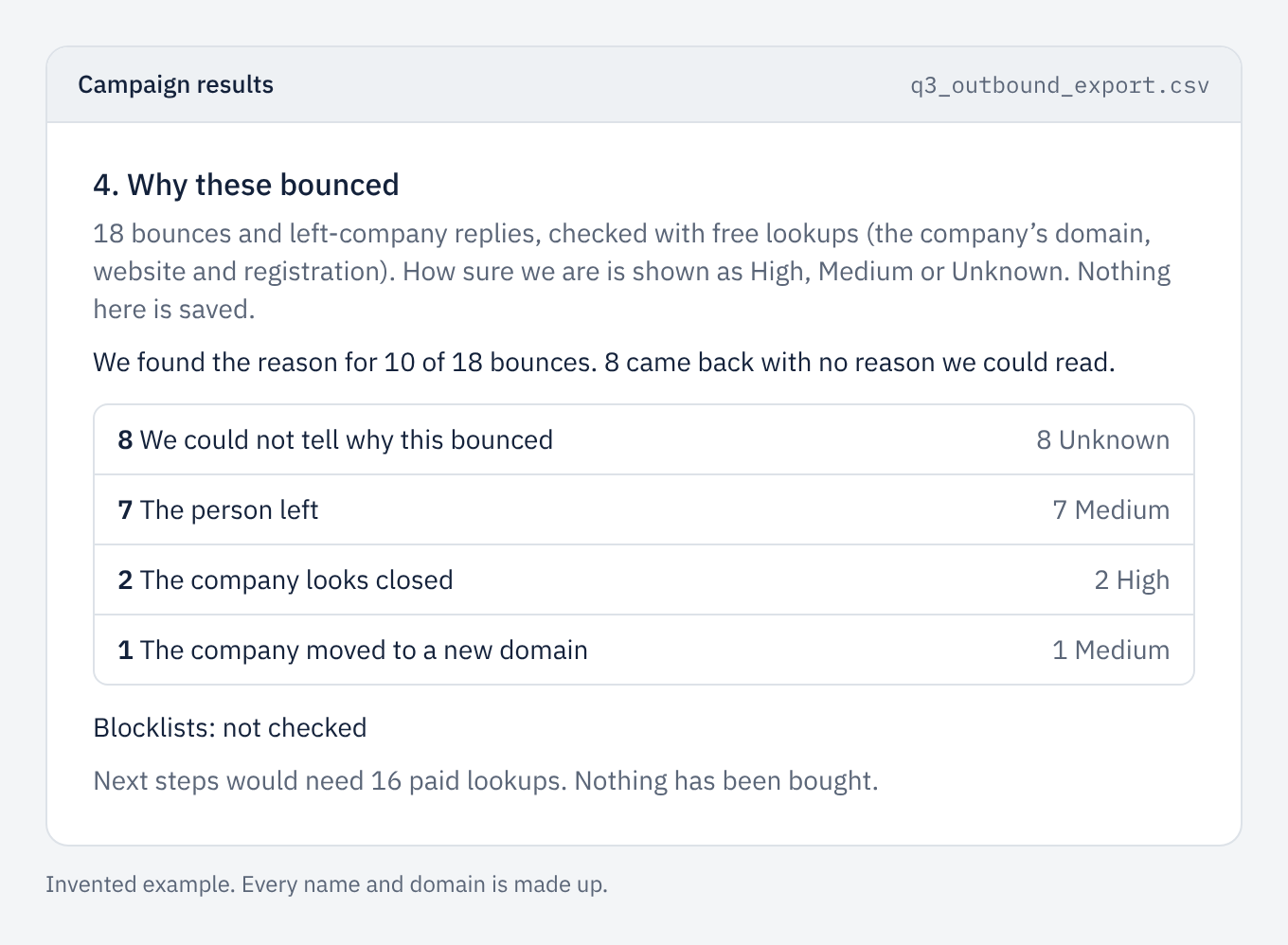
ValidScout gives each bounce a reason, so you see why your campaign bounced, not just how much. Upload your campaign's bounce export, or connect Smartlead, and the results group every bounce under one reason with a confidence word.
Here is an invented example. A founder sent 400 cold emails and 18 bounced, a 4.5% rate.
| Reason shown | Bounces | Example contact (invented) |
|---|---|---|
| We could not tell why this bounced | 8 | tom@bluepine.example |
| The person left | 7 | maya.chen@northwind.example |
| The company looks closed | 2 | sales@oldbridge.example |
| The company moved to a new domain | 1 | priya@acmeanalytics.example |
In this example none of the bounces came from the sending setup, so the founder fixes the list, not the domain. If they had, the results would show them in their own group: "Your sending setup, not your list".
Each row shows the evidence behind it and how sure we are: High, Medium or Unknown. When we cannot tell, we say so, and those rows are never counted as fine.
FAQ
Is a 5% bounce rate bad for cold email? Yes, for most senders. It sits right at Instantly's default pause line, and Smartlead's blog calls anything over 4% dangerous. Stop and find the reasons before you send more.
What is the average cold email bounce rate? On Smartlead, the typical sender bounced 1.54% in its 2026 report, based on its own platform data. Other benchmarks come from verifiers or agencies and vary, so treat any average as a rough line.
Do soft bounces count toward my bounce rate? In most sending tools, yes. But a soft bounce is temporary, so retry it before you treat it like a dead address.
Does Gmail have a bounce rate limit? Google does not publish one. It sets a spam complaint limit (under 0.1%, never 0.3%) and asks senders to slow down when messages bounce.
Can a verified list still bounce? Yes. People leave jobs, companies change domains, and some servers accept any address at check time. A check is a snapshot on the day it ran.
Sources
- Smartlead, "The State of Cold Email 2026" benchmarks (platform data, 850M+ emails; no date on the page, report file labelled 2026-H1), read 15 Oct 2026: https://www.smartlead.ai/benchmarks
- Smartlead blog, "Cold email bounce rate", updated 27 Aug 2026, read 15 Oct 2026: https://www.smartlead.ai/blog/cold-email-bounce-rate
- Instantly help, "High bounce auto pause feature", no date shown, read 15 Oct 2026: https://help.instantly.ai/en/articles/9823139-high-bounce-auto-pause-feature
- Woodpecker help, "Bounce Shield Monitor in Woodpecker campaigns", 18 Jun 2026, read 15 Oct 2026: https://woodpecker.co/help-center/en/articles/15228700-bounce-shield-monitor-in-woodpecker-campaigns
- Smartlead help centre, "What is high bounce rate auto protection in Smartlead", no date shown, read 15 Oct 2026: https://helpcenter.smartlead.ai/en/articles/274-what-is-high-bounce-rate-auto-protection-in-smartlead
- Google, Gmail Help, "Email sender guidelines FAQ", no date shown, read 15 Oct 2026: https://support.google.com/a/answer/14229414
- Google, Gmail Help, "Top 10 Gmail sender issues", no date shown, read 15 Oct 2026: https://support.google.com/mail/answer/15256272
- Microsoft Outlook blog, "Strengthening email ecosystem: Outlook's new requirements for high-volume senders": https://techcommunity.microsoft.com/blog/outlook/strengthening-email-ecosystem-outlook%E2%80%99s-new-requirements-for-high%E2%80%90volume-senders/4399730 (did not load this run; facts read on dmarcian's summary, read 15 Oct 2026: https://dmarcian.com/microsoft-enforces-spf-dkim-dmarc/)
- IETF, RFC 3463 "Enhanced Mail System Status Codes" (4.x.x temporary, 5.x.x permanent): https://datatracker.ietf.org/doc/html/rfc3463
Keep reading
Choosing a tool? Compare them
Who this is for
Next step
Check a list before you send it.
Check a list freePaste up to 50 emails. See which will not reach anyone, which need a look, and the reason for each. No sign-up, and nothing you paste is saved.
Already have a bounce export? Explain my bounces