
What does "Sender Bounced" mean in Smartlead, and how do you fix it?
"Sender Bounced" in Smartlead means the receiving server refused your email because of your sending side, such as your domain, mailbox, setup or content, not because the lead's address is wrong. Cleaning the list will not fix it; fixing the sending mailbox will.
Last checked 16 October 2026 · By the ValidScout team. Drafted with AI help, checked by the founder before it went live.
Words used in this guide
- Sender bounce: the email was refused because of who sent it or how, not because of who it was sent to. The lead's address may be fine.
- Lead bounce: the email was refused because the lead's address does not work, for example the mailbox does not exist.
- Bounce code: the short number in the bounce message, like 550 5.7.26. A code starting with 5 is a permanent refusal; one starting with 4 is temporary.
- SPF, DKIM and DMARC: three records on your sending domain that prove your emails really come from you. Gmail and Outlook check them on every email.
What is the difference between a sender bounce and a lead bounce?
A sender bounce is about you; a lead bounce is about the address. Smartlead's own help centre draws the same line: a sender bounce can happen even when the lead's address still works.
This table shows how to tell them apart and what each one needs.
| Sender bounce | Lead bounce | |
|---|---|---|
| What was refused | Your domain, mailbox, setup or content | The lead's address |
| Is the lead's address bad? | Not necessarily | Yes, or very likely |
| Typical codes | 550 5.7.1, 550 5.7.26, 550 5.7.27, 550 5.7.515, 421 4.7.28 | 550 5.1.1, 550 5.1.10 |
| What it looks like across a campaign | Many leads at many different companies fail on the same day or from the same mailbox | Scattered failures, often at old or guessed addresses |
| Fix | Your sending mailbox and domain | The list |
| Remove the lead? | No, not yet | Yes, or find who holds the seat now |
Why does Smartlead mark an email as "Sender Bounced"?
Smartlead marks an email "Sender Bounced" when the bounce message points at your side rather than the address. Its help centre groups the causes into four families:
- Reputation. A new domain, a sudden jump in volume, a change in sending pattern, or poor engagement on past emails.
- Authentication. SPF missing or wrong, DKIM not signing, DMARC not aligned with your From domain, or DNS changes that have not spread yet.
- Content. Many links or tracking links, link shorteners, heavy HTML or images, attachments, and the same template sent at high volume. Smartlead notes that a content problem rarely comes down to one word.
- Company security gateways. Tools like Mimecast, Proofpoint, Microsoft Defender and Barracuda apply stricter rules, mostly at larger companies. These refusals may show up as sender bounces too.
You find these leads with the "Sender Bounced" filter in the Email Campaign section, according to Smartlead's help centre.
What do the bounce codes behind a sender bounce mean?
The code tells you which part of your setup to look at. Gmail and Microsoft publish what their codes mean, and these are the ones that show up most behind sender bounces.
This table lists each code with the provider's own meaning and where to look first.
| Code | Who says it | What it means | Look at |
|---|---|---|---|
| 550 5.7.26 | Gmail | Not authenticated: Gmail needs SPF or DKIM, or your DMARC policy rejected the email | SPF, DKIM, DMARC |
| 550 5.7.27 | Gmail | SPF check failed | SPF record |
| 550 5.7.1 | Gmail | Blocked by policy or spam filtering; the full text says which | Full message, reputation, content |
| 421 4.7.28 | Gmail | Slowed down for now: Gmail sees an unusual rate of mail from your IP or domain | Volume, sending pattern |
| 550 5.7.28 | Gmail | Blocked: an unusual rate of unsolicited mail from your IP | Volume, reputation, stop that mailbox |
| 550 5.7.515 | Outlook.com | Your domain does not meet the authentication level Microsoft asks of high-volume senders (5,000 or more emails to Outlook.com and similar addresses) | SPF, DKIM, DMARC and alignment |
| 550 5.1.1 | Gmail | The address does not exist | This is a lead bounce, not a sender bounce |
Read the whole bounce message, not only the numbers. Smartlead's help centre gives the same warning: what a 550 5.7.1 means depends on the full message. Gmail lists several kinds of 5.7.1 on its own page.
How do you check whether a bounce is really a sender bounce?
Read the full bounce message and look for a pattern before you trust any label. A label is a first read, and it can be wrong in either direction.
- Open the bounce message for a few of the "Sender Bounced" leads. Note the code and the words around it.
- Check for "user unknown" or 5.1.1. If the message says the address does not exist, treat it as a lead bounce, whatever the label says.
- Group the bounces by sending mailbox and by day. If one mailbox or one day holds most of them, the problem is that mailbox or that day's sending, not the leads.
- Group them by the lead's email provider. If only Outlook addresses fail, start with the Microsoft rules above. If only one company's leads fail, it may be that company's security gateway.
- Read your sending domain's records. Check that SPF, DKIM and DMARC exist and that DKIM signs with your own domain.
Some senders on a community forum reported sender bounces on domains they had set up and warmed. In that thread, one of them said Smartlead support fixed most of his mailboxes after some back and forth. So a clean setup on paper does not rule out a sending problem.
What should you do about sender bounces in Smartlead?
Stop sending from the affected mailbox, find which part of your setup was refused, fix it, and only then send to those leads again from a healthy mailbox.
- Pause or slow the affected mailbox. Smartlead's help centre recommends this first.
- Find the pattern with the steps above: one mailbox, one domain, one provider or one gateway.
- Fix authentication if the codes point there: SPF, DKIM signing with your domain, and a DMARC record that aligns.
- Simplify the email: mostly plain text, fewer links, no shorteners, no attachments.
- Ramp volume up slowly on new mailboxes. Warm-up helps, but Smartlead says it is not a sure fix.
- Keep the leads. Do not delete leads that sender-bounced. Send to them again later from a mailbox that works.
- Check the real lead bounces separately. Those need list work, not setup work. Our guide on hard vs soft bounces covers that side.
Do sender bounces count toward your bounce rate?
Smartlead's auto-pause help page explains the rate as bounces divided by the campaign's leads. It does not say whether sender bounces are in that count. If your campaign paused and most of its bounces were sender bounces, the pause was about your setup, not your list.
For the lines most tools treat as too high, see what a normal cold email bounce rate is. If you also send from Instantly, our guide to an Instantly high bounce rate walks through its screens.
How ValidScout handles this
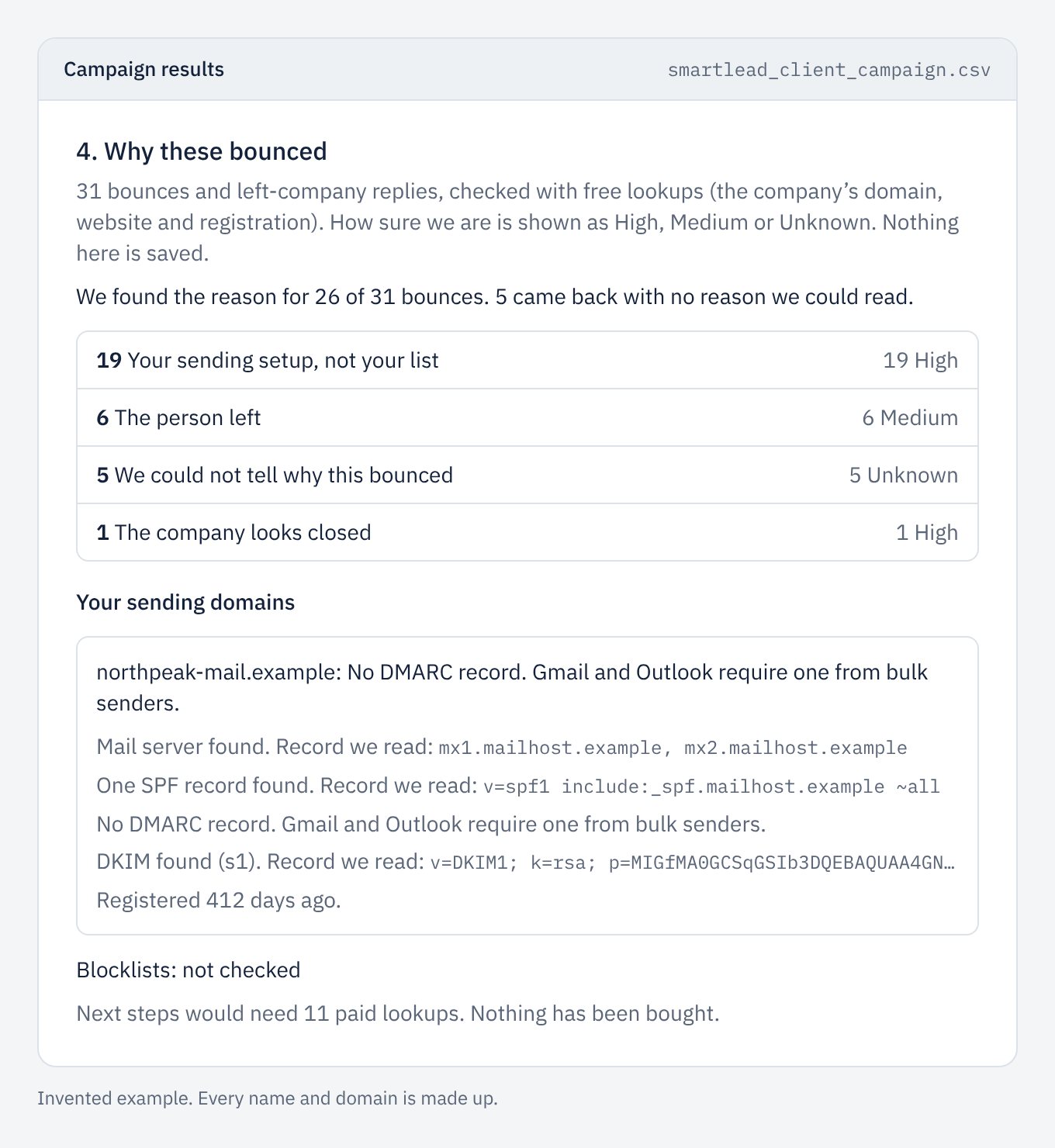
ValidScout keeps sender bounces apart from list problems, and does not count them against your leads. Connect Smartlead with your own key (read only), or upload an export, and "Why these bounced" puts every bounce under one reason with a confidence word.
Here is an invented example. An agency sent 600 emails for a client from three mailboxes. 31 bounced.
| Reason shown | Bounces | Example contact (invented) |
|---|---|---|
| Your sending setup, not your list | 19 | dana.reyes@harborline.example |
| The person left | 6 | l.okafor@greenmill.example |
| We could not tell why this bounced | 5 | k.berg@fieldnote.example |
| The company looks closed | 1 | info@oldtown-supply.example |
In this example 19 of the 31 bounces came from the sending setup, and they are not counted against the list. When bounces point at the sender, ValidScout reads your sending domain's public records (MX, SPF, DMARC and DKIM at the usual names) and shows the record it read and when. It does not check blocklists, and it says so on the screen.
When Smartlead's label and the bounce message do not agree, ValidScout says it could not tell, instead of picking one.
FAQ
Does "Sender Bounced" mean my domain is blacklisted? Not necessarily. Missing or wrong SPF, DKIM or DMARC, a sudden jump in volume, content, or a company's security gateway can all cause it. Read the bounce message before you assume a blocklist.
Should I remove leads that sender-bounced? No. Their addresses may be fine. Fix the sending mailbox, then send to them again from a healthy one.
Why do I get sender bounces when SPF, DKIM and DMARC are set up? Authentication is one of four causes. Reputation, content and corporate security gateways can still refuse a well-set-up domain. Look for a pattern by mailbox, day and the lead's email provider.
Can a "Sender Bounced" label be wrong? Yes. If the bounce message says the address does not exist (a 550 5.1.1 code), treat it as a lead bounce. The full message is a better guide than any label.
Does warm-up stop sender bounces? It helps new mailboxes build a sending history, but Smartlead's own help says it is not a guaranteed fix.
Sources
- Smartlead help centre, "What are sender bounces, why do they happen and how can you reduce them?", no date shown, read 16 Oct 2026: https://helpcenter.smartlead.ai/en/articles/458-what-are-sender-bounces-why-do-they-happen-and-how-can-you-reduce-them
- Smartlead help centre, "New feature: track sender bounced emails", no date shown, read 16 Oct 2026: https://helpcenter.smartlead.ai/en/articles/282-new-feature-track-sender-bounced-emails
- Smartlead help centre, "Bounce autopause and webhook", no date shown, read 16 Oct 2026: https://helpcenter.smartlead.ai/en/articles/210-bounce-autopause-and-webhook
- Google Workspace Admin Help, "Gmail SMTP errors and codes", updated 9 Oct 2026, read 16 Oct 2026: https://knowledge.workspace.google.com/admin/support/troubleshooting/gmail-smtp-errors-and-codes
- Microsoft Support, "Fix NDR error 550 5.7.515 in Outlook.com", updated 18 Sep 2026, read 16 Oct 2026: https://support.microsoft.com/en-us/outlook/fix-ndr-error-550-5-7-515-in-outlook-com
- Clay community, "Troubleshooting sender bounces with Smartlead", posted 23 Apr 2025, read 16 Oct 2026: https://community.clay.com/x/general/gku1p9styvsc/troubleshooting-sender-bounces-with-smartlead-emai
- IETF, RFC 3463 "Enhanced Mail System Status Codes" (4.x.x temporary, 5.x.x permanent): https://datatracker.ietf.org/doc/html/rfc3463
Keep reading
Who this is for
Next step
Check a list before you send it.
Check a list freePaste up to 50 emails. See which will not reach anyone, which need a look, and the reason for each. No sign-up, and nothing you paste is saved.
Already have a bounce export? Explain my bounces