
Instantly high bounce rate in cold email: how do you find the cause?
A high bounce rate in Instantly comes from one of two places: your list, meaning addresses that no longer work, or your sending setup. The Bounces tab in the campaign's Analytics tells you which, and you fix that side before you press resume.
Last checked 16 October 2026 · By the ValidScout team. Drafted with AI help, checked by the founder before it went live.
Words used in this guide
- Bounce rate: the share of emails sent that came back undelivered.
- Hard bounce: a permanent failure. The address or the domain does not work.
- Soft bounce: a failure that may be temporary. Instantly also files sending problems here, such as spam filters and reputation.
- Unknown bounce: a bounce Instantly could not sort into hard or soft. Its help pages do not define it further.
- Catch-all domain: a company mail server that accepts every address at first, so a checker cannot tell whether one person's mailbox is real.
When does Instantly pause a campaign for bounces?
Instantly pauses a campaign when its bounce rate goes above 5%, once the campaign has sent at least 200 emails. The paused campaign shows a "Bounces" error, which Instantly's troubleshooting guide lists under "High Bounce Rate".
Three things about the pause matter before you act:
- You can change the 5% or switch the pause off in Preferences. We suggest you leave it on. It is the alarm that stops a bad list from hurting your domains.
- After you resume, Instantly will not pause that campaign for bounces again for 7 days. If the cause is still there, that week runs without the alarm. Fix first, then resume.
- Bounced leads stop getting follow-ups. Instantly sets their status to "Bounced" and sends them nothing more, so the rest of the sequence is already protected from those addresses.
For what most tools treat as normal and too high, see what a normal cold email bounce rate is.
Where do you see why each email bounced in Instantly?
Open the campaign, go to Analytics, and scroll to the Bounces tab. It shows each bounce as Hard, Soft or Unknown. Click View on a lead to read the bounce reason the receiving server sent back.
You can also filter bounced leads in the campaign's Leads tab (Filters, Lead status, Bounced) and download them. Instantly's export help page lists the columns in that download, and a bounce reason is not one of them. So read the reasons in Analytics before you export.
Is it your list or your sending setup?
Sort the reasons you read into two piles. This table uses the causes Instantly's own help lists and shows which side each one belongs to.
| What the bounce reason points to | Instantly usually files it as | Side | What to do |
|---|---|---|---|
| Address does not exist, deleted or typo | Hard | List | Remove the lead, or find who holds the seat now |
| Domain does not exist | Hard | List | The company may have closed or moved domain |
| Catch-all domain that accepted, then rejected | Soft | List | Treat catch-all addresses as risky, see catch-all emails |
| Inbox full, server down for now | Soft | Neither, for now | Try again later |
| Sender reputation, spam filter, blocked by policy | Soft | Setup | Pause that mailbox, check SPF, DKIM and DMARC |
| Near-identical copy, links in step 1, heavy HTML | Soft | Setup | Simplify the first email |
| Sending too much too fast | Soft | Setup | Lower daily volume, ramp up slowly |
| Company security gateway (Proofpoint, Mimecast, Microsoft Defender) | Soft | Setup | Expect stricter rules at larger companies |
| No reason given | Unknown | Not known yet | Look for a pattern before you decide |
Instantly's help says poor lead quality is the usual cause of hard bounces. Soft bounces are more mixed, and several of them are about how you send, not who you send to.
How do you check the cause before you press resume?
Look at the pattern, not one bounce. A few minutes here decides whether you clean the list or fix the mailboxes.
- Count hard against soft in the Bounces tab. Mostly hard points at the list. Mostly soft points at your setup or at catch-all domains.
- Open a few reasons with View. Note the code and the words. A 550 5.1.1 means the address does not exist. A 550 5.7.26 or 5.7.1 points at your sending side. Our guide on Smartlead sender bounces lists what Gmail's and Microsoft's codes mean, and they are the same codes whatever tool you send from.
- Group the bounces by sending account and by day. If one account or one day holds most of them, the problem is that account or that day's sending.
- Group them by the lead's company domain. Many bounces at one company can be its security gateway. Bounces spread across many old contacts usually mean an old list.
- Check how old the list is. People change jobs, and a list built a year ago holds addresses of people who have left.
What should you fix, list or setup?
Fix the side the pattern points at, then resume slowly.
If it is the list:
- Remove or set aside the hard-bounced leads.
- Check the rest of the list before you send to it again. Instantly suggests verifying leads before launch and sending only to verified ones.
- For people who left, find who holds the seat now instead of guessing a new address.
If it is your setup:
- Pause the affected sending accounts.
- Check MX, SPF, DKIM and DMARC on your sending domains.
- Send the first email as plain text, with no links, images or attachments.
- Lower daily volume. Instantly suggests at least 2 weeks of warm-up, then about 30 cold emails and 10 warm-up emails a day per account.
- Resume gradually, and keep warm-up running alongside the campaign.
Do not delete leads that bounced for setup reasons. Their addresses may be fine.
Does Instantly's BounceShield stop this?
BounceShield helps before you send, not after. Instantly says it skips leads on your blocklist, leads its AI filter marks as unlikely to reply or hostile, and leads over a company send limit. Skipped leads show as "Skipped" in the campaign. It does not explain why an email that already went out bounced. Keep it on, and still read your bounce reasons.
How ValidScout handles this
ValidScout does not connect to Instantly. You upload the bounced-lead download, and "Why these bounced" checks each bounced contact's company with free public checks: does the domain still exist, does it still receive email, does the website answer, did it move to a new domain.
Instantly's lead download does not carry the bounce message, so ValidScout cannot read the server's reason from it. That means it cannot tell from the file alone when a bounce was your sending setup. Where its own checks do not settle a bounce, it says "We could not tell why this bounced" rather than guess. For setup bounces, the reasons in Instantly's Analytics are the better guide.
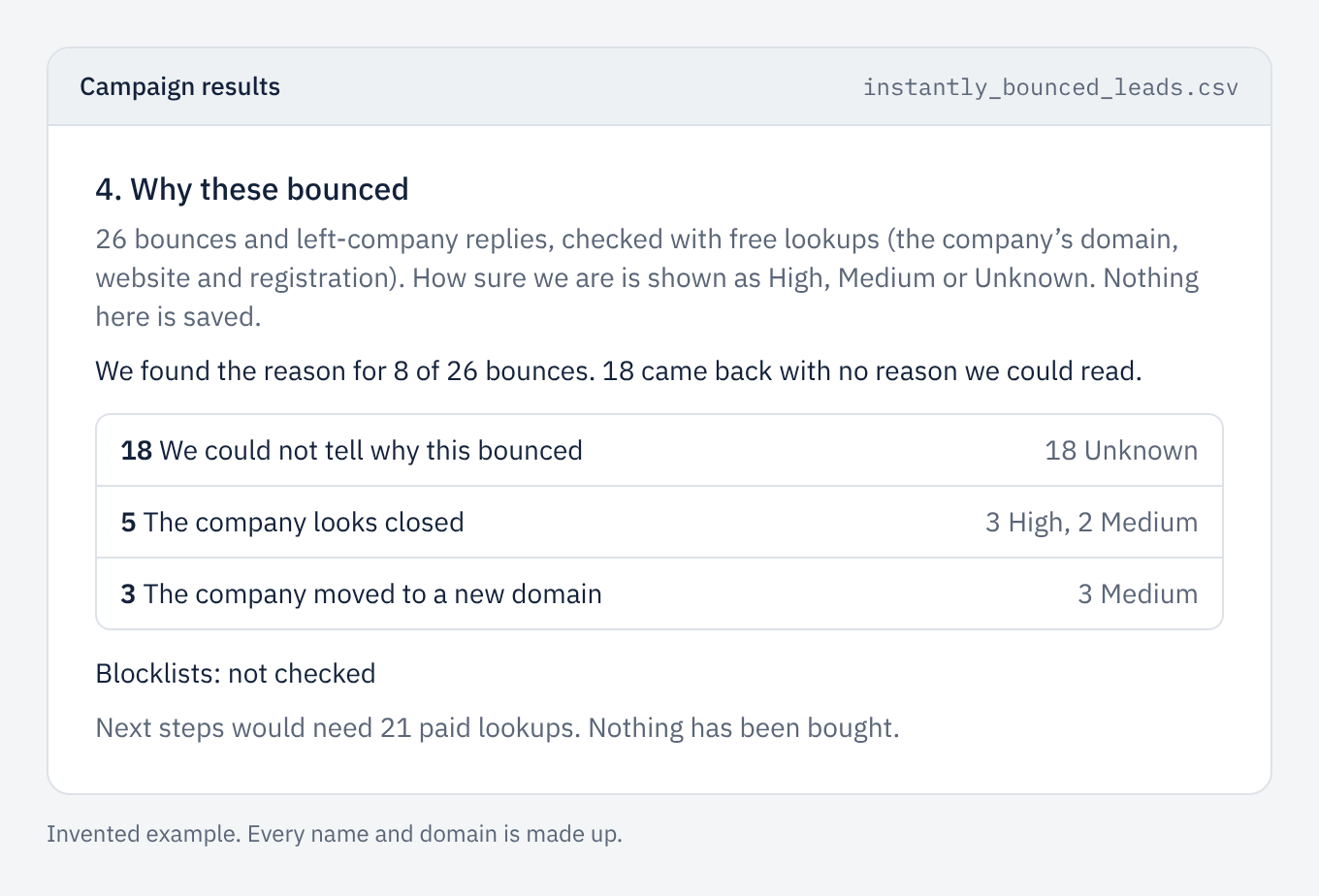
Here is an invented example. A founder sent 400 emails from Instantly. 26 bounced and the campaign paused. They uploaded the 26 bounced leads.
| Reason shown | Bounces | Example contact (invented) |
|---|---|---|
| The company looks closed | 5 | info@oldmill-goods.example |
| The company moved to a new domain | 3 | j.park@brightlane.example |
| We could not tell why this bounced | 18 | m.osei@tidewater.example |
In this example 8 of the 26 bounces trace to the company, with the domain and website reads shown for each. The other 18 need the reasons from Instantly's Bounces tab, or a list check before the next send.
FAQ
What bounce rate makes Instantly pause a campaign? Above 5%, once the campaign has sent at least 200 emails. You can change the number or turn the pause off in Preferences.
Should I turn off Instantly's auto-pause? We would not. After a resume you already get 7 days without it. Turning it off for good removes the alarm that protects your sending domains.
My leads were verified. Why did they still bounce? A verified address can still bounce. Catch-all domains accept at first and reject later, people leave jobs after the check, and soft bounces can be about your sending, not the address.
Does Instantly show the reason for each bounce? Yes, in the campaign's Analytics, Bounces tab, under View. Instantly's export help page does not list a reason column in the leads download.
Can ValidScout tell me if my Instantly bounces were a sending problem? Not from Instantly's lead download, because it has no bounce message. ValidScout checks the companies behind the bounces and says when it could not tell.
Sources
- Instantly help, "High Bounce Auto-Pause Feature", no date shown, read 16 Oct 2026: https://help.instantly.ai/en/articles/9823139-high-bounce-auto-pause-feature
- Instantly help, "Understanding and Fixing Campaign Email Bounces", no date shown, read 16 Oct 2026: https://help.instantly.ai/en/articles/7187587-understanding-and-fixing-campaign-email-bounces
- Instantly help, "Managing Bounced Leads", no date shown, read 16 Oct 2026: https://help.instantly.ai/en/articles/7911994-leads-that-bounce
- Instantly help, "Campaign Error: Troubleshooting Guide", no date shown, read 16 Oct 2026: https://help.instantly.ai/en/articles/7907713-campaign-error-troubleshooting-guide
- Instantly help, "How to export data from your Instantly account", no date shown, read 16 Oct 2026: https://help.instantly.ai/en/articles/13924078-how-to-export-data-from-your-instantly-account
- Instantly help, "BounceShield skipped leads", no date shown, read 16 Oct 2026: https://help.instantly.ai/articles/8486604-bounceshield-skipped-leads
- Google Workspace Admin Help, "Gmail SMTP errors and codes", updated 9 Oct 2026, read 16 Oct 2026: https://knowledge.workspace.google.com/admin/support/troubleshooting/gmail-smtp-errors-and-codes
Keep reading
Next step
Check a list before you send it.
Check a list freePaste up to 50 emails. See which will not reach anyone, which need a look, and the reason for each. No sign-up, and nothing you paste is saved.
Already have a bounce export? Explain my bounces